
Step-by-step instruction for check Windows 7 notebook could run at full speed without laptop battery. The steps required for older operating systems are basically similar, but the details may be slightly different.
- Startup your laptop without notebook battery.
- Open start menu and type Power Options into the search box to open Power Options control panel.
- Remember which power plan is currently selected (so that you can restore the setting later) and switch to Maximum Performance power plan.
- Close Battery Power Options control panel.
- Open start menu and type Performance Monitor into the search box and start it.
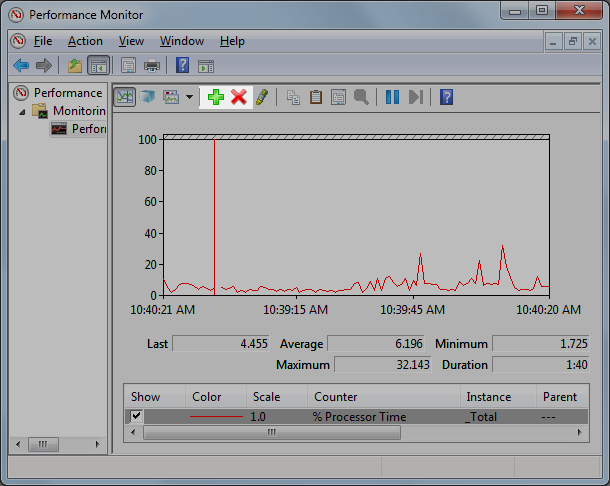
- Performance Monitor starts up with CPU utilization (% Processor Time) graph (Figure 8).
- Press “X” button above the graph to remove the data.
- Press “+” button to open Add Counter dialog box.
- Expand Processor Information group in the right-top list box and select % of Maximum Frequency. (Figure 9)
- Select <All instances> in the right-bottom list box. (Figure 9)
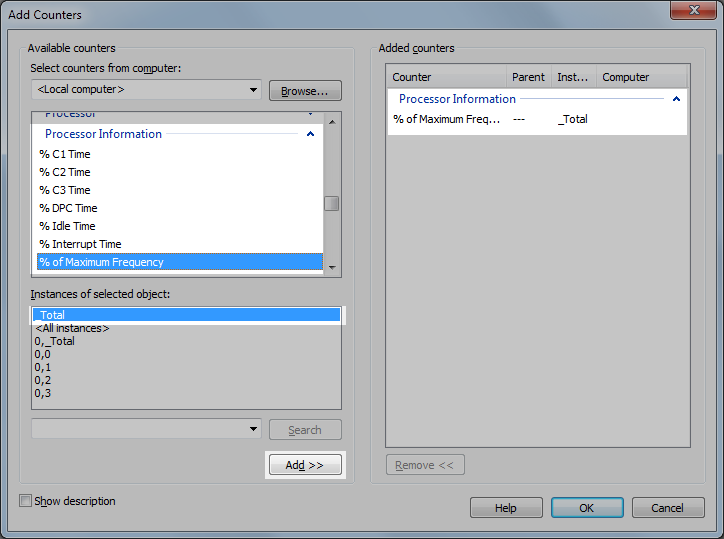
- Press Add >> button.
- Make sure that the selected counter appears in the list box in the right and press OK button. (Figure 9)
- See how the numbers shows with some workloads. If the number is always 100%, it means your laptop can operate at 100% performance without Acer As07a31 Laptop Battery.
- After you are finished, repeat step 2-3 and restore the original power plan setting.
